PDF to Excel That Gives You Real Numbers — And Proves It Got Them Right
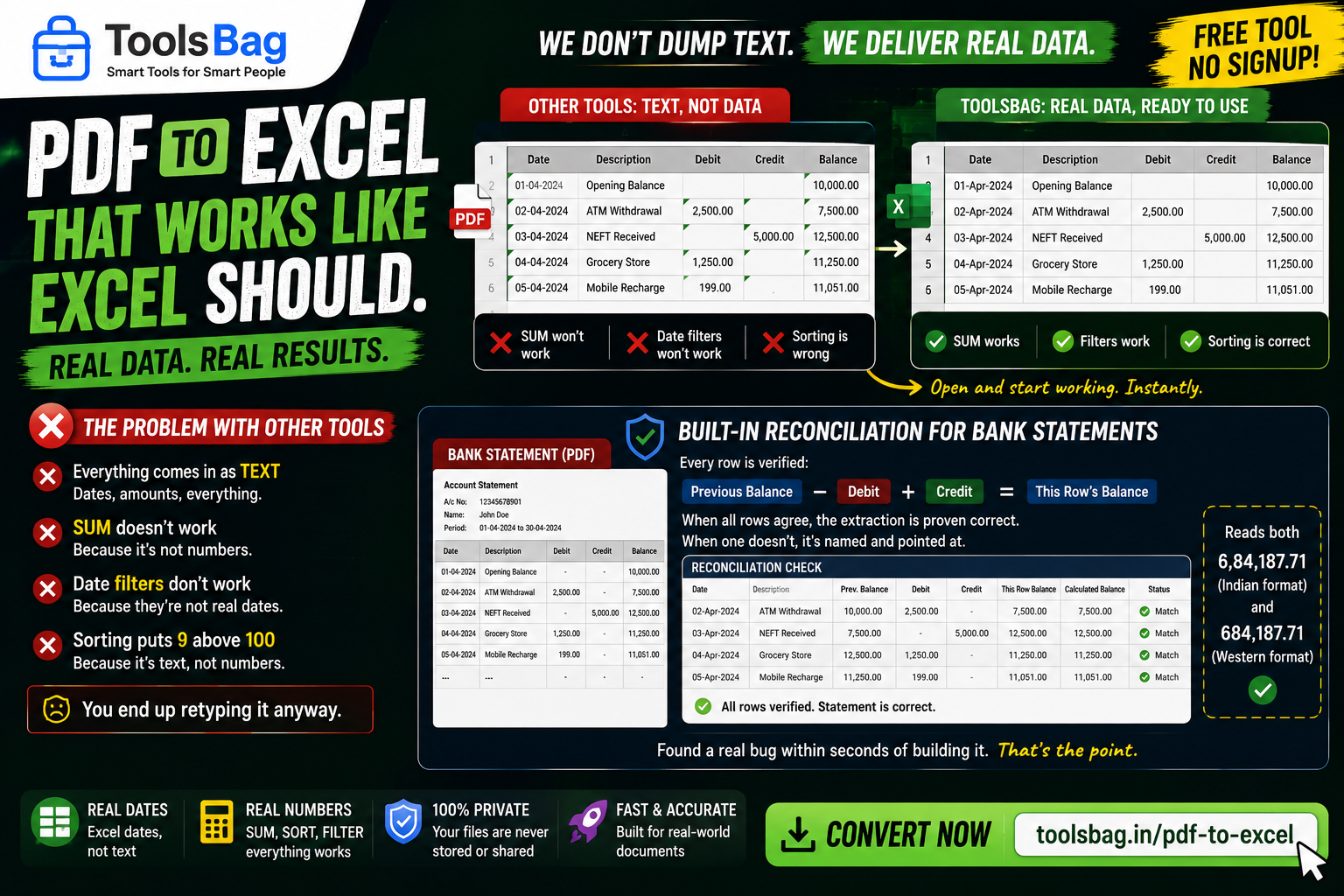
Most converters dump the whole table into Excel as text. So the moment it opens: SUM doesn’t work, date filters don’t work, and sorting puts 9 above 100. You have a spreadsheet you can look at but not compute with — so you retype it anyway.
Values keep their type
A date becomes a real date, an amount a real number. SUM and date filters work the second the file opens. It also reads both Indian and Western digit grouping — 6,84,187.71 and 684,187.71 — along with Dr/Cr suffixes and parenthesised negatives.
Bank statements are reconciled
This is the part worth knowing about. A statement carries a running balance, which means every row can be checked: previous balance, minus debit, plus credit, must equal this row’s balance.
When all of them agree, the extraction is proven correct — not merely plausible. When one doesn’t, it’s named and pointed at, so you know exactly which row to look at rather than distrusting the whole file.
That check caught a real defect within seconds of being written, which is rather the point of writing it.
One limitation, stated up front
Only PDFs with a text layer can be read. A scan is a picture of a table, and there’s no OCR here to recover it. Up to 300 pages and 50,000 rows.
Free, no signup → Try PDF to Excel